

Yours, and the practice’s
Each clinician keeps personal phrases and the practice keeps a shared set. When both use the same shortcut, yours wins.
Practice / Phrases
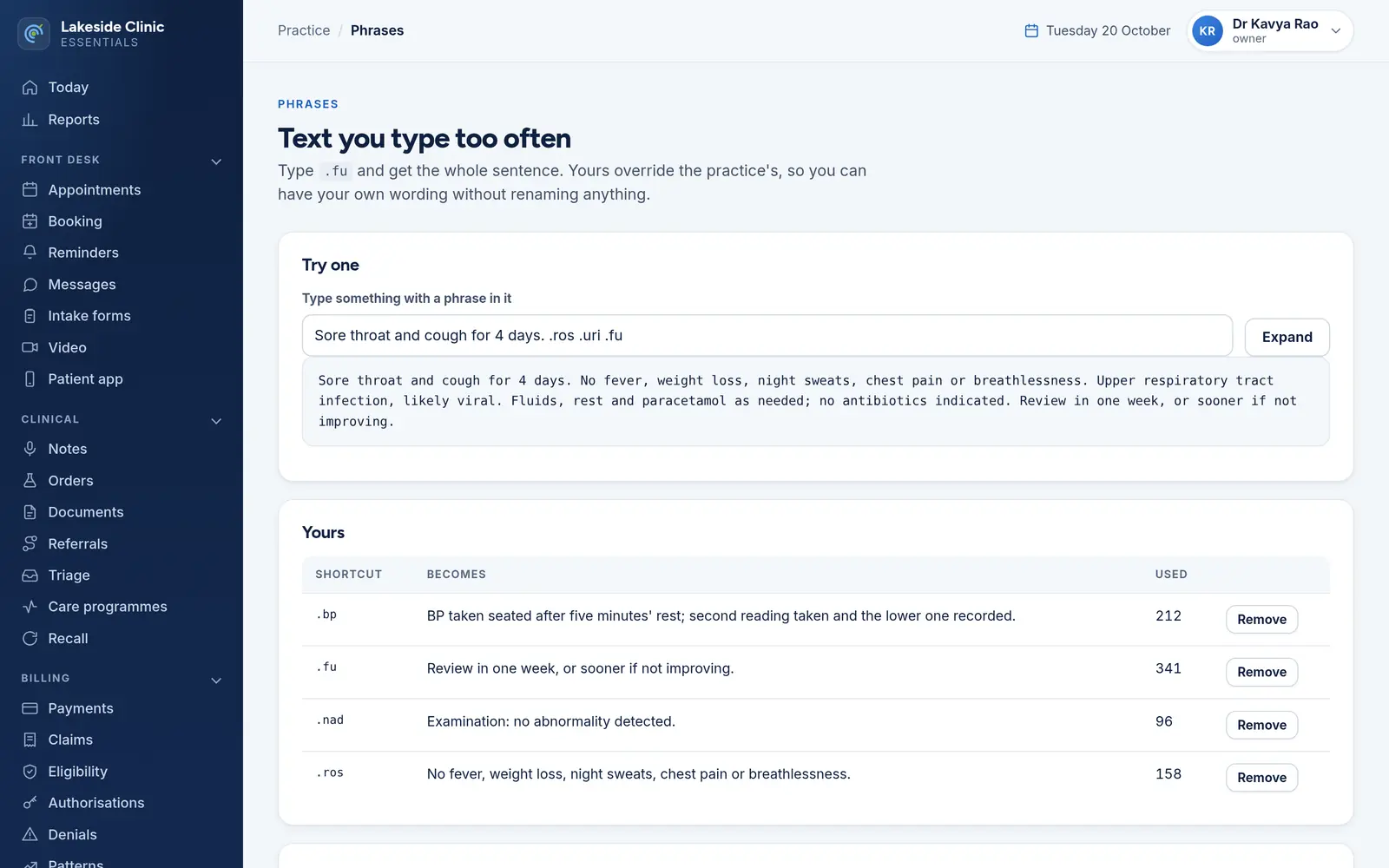
Shortcuts for the sentences a clinician types forty times a day. Personal phrases override the practice’s, so two clinicians can each have their own “.fu” without either knowing about the other’s.
What it does
Each clinician keeps personal phrases and the practice keeps a shared set. When both use the same shortcut, yours wins.
“.fu” never fires inside “.further”, and a phrase can contain other phrases, expanded up to three levels deep.
New phrases are personal by default; making one practice-wide is a deliberate choice, and nobody can remove another clinician’s personal phrase.
A preview box expands a sentence, and each phrase shows how often it has been used.
How it works
“.fu” and the sentence it stands for.
Personal unless you choose otherwise.
Type a sentence with the shortcut and see it expand.
What it needs
Every module switches on and off by itself, per clinic, with its own screens, permissions and audit trail.
Worth knowing
Phrases expand when a scribe note is approved and when a note is placed through Orders. They do not expand as you type in other boxes.
The demo runs every module against an unmodified OpenEMR, with invented patients. Nothing to install and no sales call.


